
TL;DR
A look at how the document extraction engine behind our agentic platform is built; the decisions, the documents that forced them, and the parts that are deliberately not intelligent.
OI Parser decides at the smallest useful unit: page, slide, sheet, or image, whether structure can be read directly or needs to be rebuilt. It combines layout-aware extraction, visual interpretation, format-specific handling, deterministic routing, and fallback strategies to preserve the structure downstream AI systems rely on.
The result is a compact, self-hosted document intelligence stack designed to run inside the customer’s own environment, with document content staying within their infrastructure.
Every document extraction pipeline starts the same way. Render the page to an image, hand it to a vision model, ask for markdown back. It is about forty lines of code, and on the first ten documents you try, it is genuinely impressive.
Then you point it at a real enterprise document estate and it comes apart in four specific places.
- The table survives as text and dies as a table. Every number is present. The rows and columns that told you what those numbers meant are gone. A balance sheet with its grid flattened is not a lossy version of the truth; it is a different document.
- The chart is read but not understood. The model reports the axis labels, the legend and the title, perfectly. It does not report what the chart says, because reading the text printed on a figure is not the same task as recovering the data behind it.
- The same logo is interpreted forty times. Once per page, forty separate readings of the same square inch of paper, and not even forty identical ones, because the same picture described twice can come back worded two different ways.
- The spreadsheet arrives as a wall of numbers. The merged header that grouped four columns under one year is gone. The category label that applied to six rows now applies to one. And a cell holding 0.845 formatted as a percentage arrives as 0.845, which is not a rounding error, it is a different number.
None of these are model quality problems. Swapping in a larger model moves each one a little and fixes none of them, because they are all structural: the pipeline threw the structure away before the model ever saw the page.
That is what OI Parser is built around. What follows is how – not the source code, and not the model stack, but the architecture, and the reasoning behind each decision in it.
1. Every page gets the treatment it needs
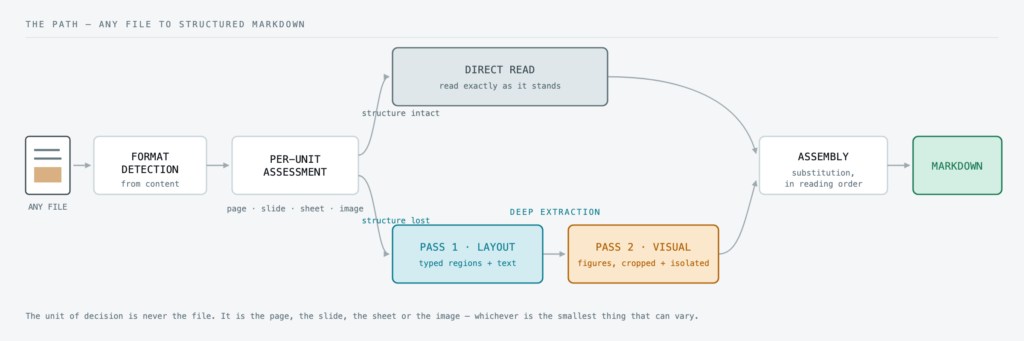
The first thing OI Parser does to a page is not extraction. It is a judgement about what that page actually requires.
This matters because documents are not uniform. Some pages arrive with their structure completely intact: born-digital prose, a clean text layer, headings that are genuinely headings. Reading those directly is not a compromise, it is the better answer. It is immediate, and it is perfectly faithful, because nothing can improve on text that is already exactly right. Putting it through a vision model would only introduce the one risk you least want: that something already correct comes back rewritten.
Other pages have lost their structure entirely. A scan. A photograph of a contract. A dense financial page where the meaning lives in a grid, three charts and a column of Arabic. Those need OI Parser’s full capability, high-fidelity layout detection followed by visual interpretation, which is what the next two sections describe.
So every page is judged on its own, and each one is sent to the treatment that will genuinely serve it: a direct read where the structure is already there, deep extraction where it has to be rebuilt.
How that judgement is made. Not by a single test. Several independent signals each score the page on a different aspect of structural complexity, and those scores combine into one verdict. The thresholds behind it were calibrated against an internal benchmark corpus with known-correct output rather than chosen by intuition, and they are tuned deliberately toward one side.
The reason is that the two possible misjudgments are nothing alike:
If the assessment gets it wrong | What actually happens |
|---|---|
A simple page sent to deep extraction | It takes a little longer. The output is identical and correct. Nobody is worse off. |
A complex page sent to a direct read | A table, a chart, a formula, a line of Arabic, quietly gone. The output still looks fine. |
That one-sidedness is deliberate, and everything downstream depends on it. No amount of retrieval tuning recovers a chart that was never extracted in the first place.
The same judgement then repeats at every level. It is never made once per file. It is made per page, per slide, per sheet and per image, because those are the units at which real documents actually vary.
2. Structure before content
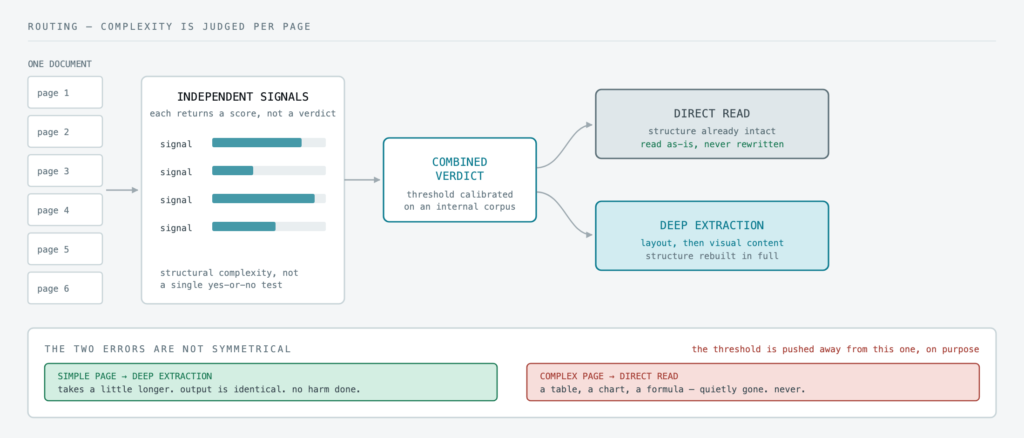
For a page that goes to deep extraction, the work happens in two passes, and the first of them is still not content extraction. It is layout detection.
A layout pass returns the page as a set of typed regions: title, paragraph, table, figure, chart, caption, header, footer, formula, each one classified, positioned, and with its text already read. Not a wall of characters in reading order. A structural description of the page, with the content attached to that structure.
That single difference is what decides whether the output survives a real document:
A two-column page read flat interleaves the columns into nonsense. Read structurally, each column is its own region and the reading order comes out right.
A running header repeated across ninety pages is labelled as a header, instead of being injected ninety times into the body text.
A caption stays attached to the figure it belongs to, rather than drifting into the paragraph above it.
A formula arrives as a formula, not as a scatter of loose characters that happened to sit near each other.
A figure or chart is identified as a region to be interpreted, not silently skipped because it contained no readable text.
Tables are the most visible case of all. A layout-aware pass returns a table as structured markup: cells as cells, headers as headers, spans as spans, nesting preserved. That structured output then goes through a deterministic post-processing stage that normalises and cleans it into the final markdown. Neither half is sufficient alone, the structure-aware first pass is what makes the grid recoverable at all, and the mechanical cleanup afterwards is what makes it reliable. An approach that leads with character recognition never has the grid to begin with; it has a sequence of numbers that used to be in one.
The second pass then handles visual content: pictures, plots, charts, figures, infographics, diagrams, the regions where the meaning is not in any text on the page.
Two passes rather than one, because a single model asked to both read a page and interpret its figures does neither job well. Splitting them lets each call use a prompt, a set of parameters and an image preparation tuned for exactly one task. That means one extra call per figure and in exchange, each call does one job properly instead of two jobs badly.
3. Crop and isolate
When a figure goes to the second pass, it does not go as part of its page. It is cropped out and sent on its own.
This sounds like a detail and it is one of the largest single levers in the whole pipeline. A chart that is one of fifteen elements competing for attention on a dense page is a far harder problem than the same chart alone in the frame. A full-page call pays a distraction tax on every element it looks at. The cropped call pays none, it sees one chart, and it is asked exactly one question about it.
The same principle governs how the result comes back. A described figure is not appended to the end of the document. It is substituted into the placeholder the figure left behind, so a chart stays precisely where it sat in the reading order, next to the paragraph that referred to it.
4. Never interpret the same picture twice
Real documents repeat themselves relentlessly. A logo on every page. A chart carried across a deck. A figure reused between two sections of a report. Handled naively, every repeat is a fresh interpretation of a picture that has already been interpreted — slower, and not even self-consistent, because the same image described twice can come back described differently.
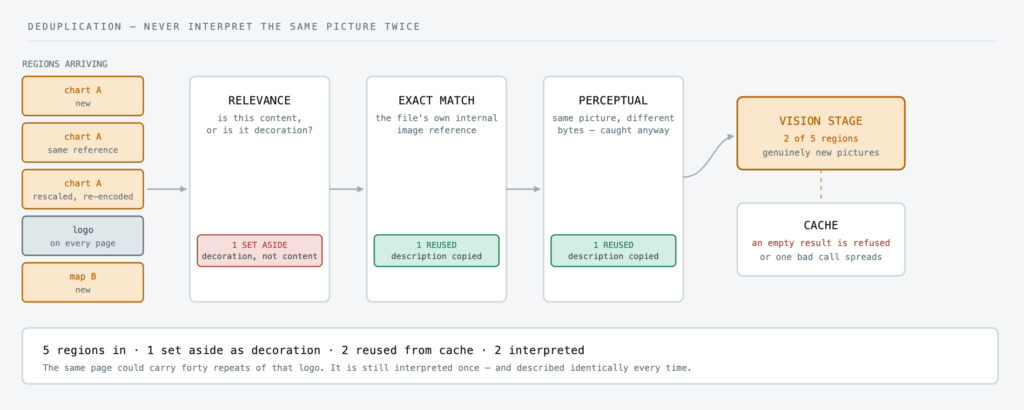
Three checks sit in front of the vision stage, in order:
- Relevance scoring. Not every image is content. Logos, rules, borders, spacers and background decoration are recognised as decoration and set aside, so OI Parser spends its visual attention on the figures that actually carry meaning.
- Exact matching. Many formats store an image once and reference it many times. Where that internal reference is available, repeats collapse immediately and exactly.
- Perceptual matching. The harder case is the same picture re-encoded, rescaled or re-compressed, so the bytes differ but the picture does not. A perceptual match catches those. A logo appearing forty times, in four different sizes, is interpreted once.
One description is then held in a per-document cache and mapped back to every placeholder in its group, which also means those forty appearances are described identically, rather than forty different ways.
One detail about that cache is worth calling out, because it was learned the hard way: an empty or failed result is refused entry. Cache a failure once and it gets replayed onto every subsequent copy of that image, turning one bad call into a document-wide defect. The cache only ever accepts a real answer.
5. Every format is a different document
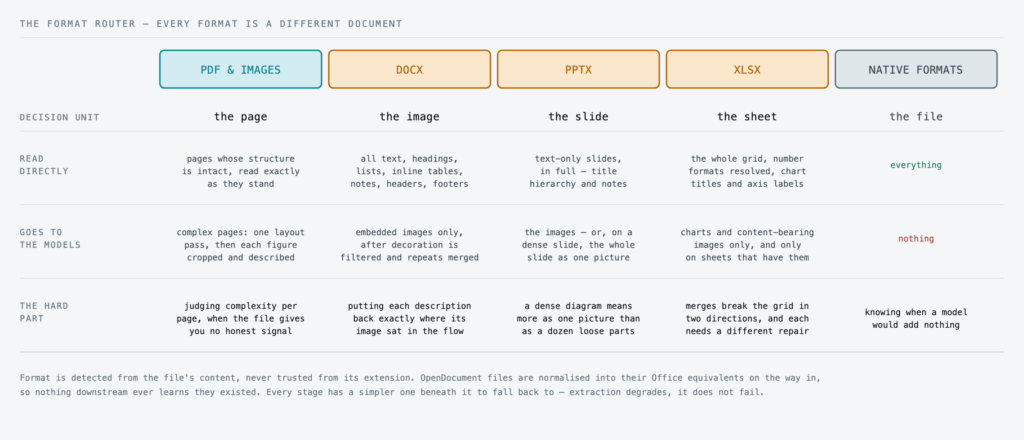
Almost every public benchmark for document parsing measures PDFs. PDFs are a minority of most real document estates. The interesting engineering is in what the other formats need, because they are not PDFs with a different extension. They are different objects, and the unit of judgement changes with each one.
Format is detected from the file’s actual content, never trusted from its extension. OpenDocument files are normalised into their Office equivalents on the way in, so nothing downstream ever learns they existed.
PDFs and images
This is OI Parser’s fullest capability, and the one the sections above have been describing: every page judged on its own, then either read directly or rebuilt in two passes.
A standalone image , a photograph, a screenshot, a scanned chart, is treated as a one-page document, with one deliberate inversion. On a page of prose, character recognition leads. On a lone chart or photograph there is often very little text to recognise and almost everything depends on interpreting what is shown, so OI Parser reaches for visual interpretation first and falls back to character recognition only if that comes back empty.
DOCX
The text in a Word document is already structured and already correct, so OI Parser reads it directly. Heading hierarchy, lists, inline tables, footnotes, headers and footers all come straight out of the file – nothing to infer, nothing to misread.
Only the embedded images go through the vision stage. Each leaves a placeholder where it sat, the images that carry meaning are interpreted, and a substitution pass returns each description to its own placeholder at the right point in the flow. The relevance filter and deduplication from the previous section both apply, so a report carrying a letterhead on all ninety pages describes that letterhead at most once.
PPTX
A slide is not a page of prose. It is a composition – and that moves the unit of judgement from the file to the slide.
Three outcomes, decided per slide:
No images → the text is read directly. There is nothing to interpret.
A few images → each one is interpreted on its own.
Many images → the slide is rendered and interpreted as a single picture.
That last case is the one worth explaining. An architecture diagram built from a dozen arranged shapes, arrows and labels means something as a whole that twelve separate descriptions of twelve boxes would completely lose. Past a certain density, describing the composition is simply more faithful than describing the components. The deck-to-image conversion happens once for the whole file, not once per slide.
XLSX
The most intricate of OI Parser’s format handlers, because a workbook is not one document. It is N documents that can each need different handling – so the strategy is chosen per sheet, never per file.
What drives that choice is merged cells, and the reason is specific: a spreadsheet’s meaning lives in its grid, and the two kinds of merge break that grid in opposite directions.
- A header spanning several columns – one
2026sitting above four quarter columns. A markdown pipe table cannot express this. Not “expresses it poorly” – there is no syntax for it at all. Rendered straight to markdown, the grouping is simply deleted, and four quarters that belonged to a year become four unattached columns. Sheets like this are taken through an HTML representation first, which can carry a spanning header, and converted down from there with the grouping intact. - A label spanning several rows – one
EMEAbeside France, Germany and Spain. Read cell by cell, the label lands on the first row and the other two get nothing. France and Germany silently lose the region they belong to, and in a retrieval pipeline that is a chunk that no longer says what it is about. Sheets like this get a reader that carries the merged value down, so every row stays self-describing.
Two more things happen in the spreadsheet handler that are easy to miss:
- Chart objects give up their own metadata first. A native chart in a workbook carries its title, axis labels and series names inside the file. Those are read straight out before any interpretation happens, so a chart that does reach the vision stage arrives already labelled – the vision stage is asked to interpret the data, not to work out what it is looking at.
- Number formats are resolved to meaning. A cell holding
0.845displayed as a percentage means 84.5%, and a cell holding a serial number displayed as a date means that date. Reporting the stored value is not a small loss of fidelity; it is a factually different answer. Formats are applied, formulas resolved to their computed results, and multi-sheet and named-range structure preserved.
Everything else
CSV, HTML, XML, plain text, RTF, EPUB, email, and a range of columnar data formats are read directly, with no model involved at any point. These formats already carry their own structure. Running a vision model across them would add time and risk while recovering nothing that was not already there.
6. Everything around the models is deterministic
This is the part that tends to surprise people, so it is worth stating plainly.
There is no planner. No judge. No agent loop. No model deciding what another model should do next.
The models do perception, and only perception: one reads structure, one interprets visual content. Everything around them is ordinary, inspectable code. Assembly is substitution. Turning region types into markdown is a role-to-syntax mapping. Every routing decision in this post is a rule or a calibrated score.
That is a deliberately unfashionable choice in 2026, and there are three reasons for it:
It is reproducible. The same document produces the same output. A pipeline with a model in the control loop cannot reliably promise that.
It is traceable. Every decision is recorded against the unit it applied to, so a result can be explained months later – which page got which treatment, and on what basis.
It is debuggable. When deterministic code produces the wrong markdown, you can find out why. When a model in a control loop produces the wrong markdown, you can mostly only try again.
7. It always produces something
The last architectural commitment is the least glamorous and the most important in production: extraction does not fail.
Every specialised stage has a simpler one beneath it. If the vision stage is unavailable, layout detection still runs. If layout detection is unavailable, direct reading still runs. A format-specific handler that throws falls back to the general one. The pipeline degrades through progressively simpler strategies rather than stopping – because an overnight ingestion run that finishes with reduced fidelity on nine documents is a far better outcome for a customer than one that finishes with an exception on one.
Alongside that sits a structural rule learned in production: the input guard sits above the handlers, not inside them. A document that should be refused – too large, unsupported, malformed – has to be refused at the boundary. A refusal raised inside a handler gets caught by that handler’s own recovery logic, becomes an anonymous failure, and is then retried several times before anyone discovers it was never going to work. Refuse once, clearly, at the top.
The principle underneath all of it
Every mechanism in this post is an instance of one rule:
Put the models where structure has to be rebuilt – and decide that at the smallest unit you can.
A page, a slide, a sheet, an image. Never a whole file. Structure that already exists in the source is read, not inferred. Structure that has been destroyed – a scanned page, a chart, a photographed document – is where the models do their real work, and where they are worth every millisecond.
That is also the answer to the question we are asked most often: how a compact, self-hosted stack holds its own against frontier vision models. It is not a better model. It is that most of the work was never a model’s job in the first place, and OI Parser is built to know the difference.
Which is what makes it deployable where it matters most: on hardware the customer owns, inside their own perimeter, with no document content ever leaving the deployment.

Thiago Santos
Senior AI Engineer